New Amazon Fire TV Replacement Remote Control For Stick 4K Max
Streaming DeviceUSD $13.94
Condition : New
Free Shipping
{{variant_type_name}} :

Notify me when the price drops
We will email you if we find a lower price on this product!
Amazon Fire TV Replacement remote for Stick 4K Max streaming device, supports Wi-Fi 6E, free & live TV without cable or satellite1. Precise Compatibility List: Covers a Multi-Brand Smart Device Matrix
This replacement voice remote is specifically designed for cross-brand smart devices, accurately compatible with Insignia, Toshiba, Pioneer, and Amazon ecosystem devices. It fully covers the following series and models to avoid the risk of incorrect purchase:
Compatibility with Mainstream TV Brands
Insignia Smart TVs: F30, F20, F50, DF710, DF711, DF310, DF510, DF311, DF620 series
Toshiba Smart TVs: LF711, LF621U, LF421U, LF221U, C350, A810U, A710U, M550, V35 series
Pioneer TVs: PN450, PN651, PN851, PN951, PN55851-23U, PN50951, PN43951-22U, PN43651, PN32451 series.
Exclusive Compatibility with Amazon Devices
Amazon Smart TVs: All models of the Omni series and AMZ 4 series;
Fire TV Devices:
Fire TV Stick (1st/2nd/3rd Gen), Fire TV Stick 4K Max (1st/2nd Gen), Fire TV Stick 4K (1st/2nd Gen), Fire TV Stick Lite;
Fire TV Cube and Smart TVs (3rd Gen);
2. Voice Pairing & User Guide: One-Key Activation of Smart Control
This remote adopts dual technologies of "Bluetooth automatic pairing + voice wake-up" and supports Alexa smart voice interaction. The entire operation takes no more than 3 minutes:
Preparation Before Pairing
Prepare 2 AAA dry batteries in advance (not included in the package);
3-Step Pairing Process
Battery Installation: Open the snap-on battery compartment on the back of the remote, insert the batteries according to the positive and negative markings, and the indicator light will turn on briefly after closing the compartment;
Start Pairing: Press and hold the "Home Button" at the top of the remote for 10-15 seconds until the LED indicator flashes rapidly (at a frequency of approximately 2 times per second);
Complete Connection: Release the button and wait for 60 seconds. A "Pairing Successful" prompt will appear on the TV/device screen, and you can then test voice commands.
Troubleshooting for Pairing Failures
If pairing fails, disconnect the device from power for 30 seconds, restart it, and try again;
Ensure the distance between the device and the remote is within 10 meters, and there are no Bluetooth interference sources.
3. Core Feature Highlights: Dual Control via Voice + Shortcut Keys
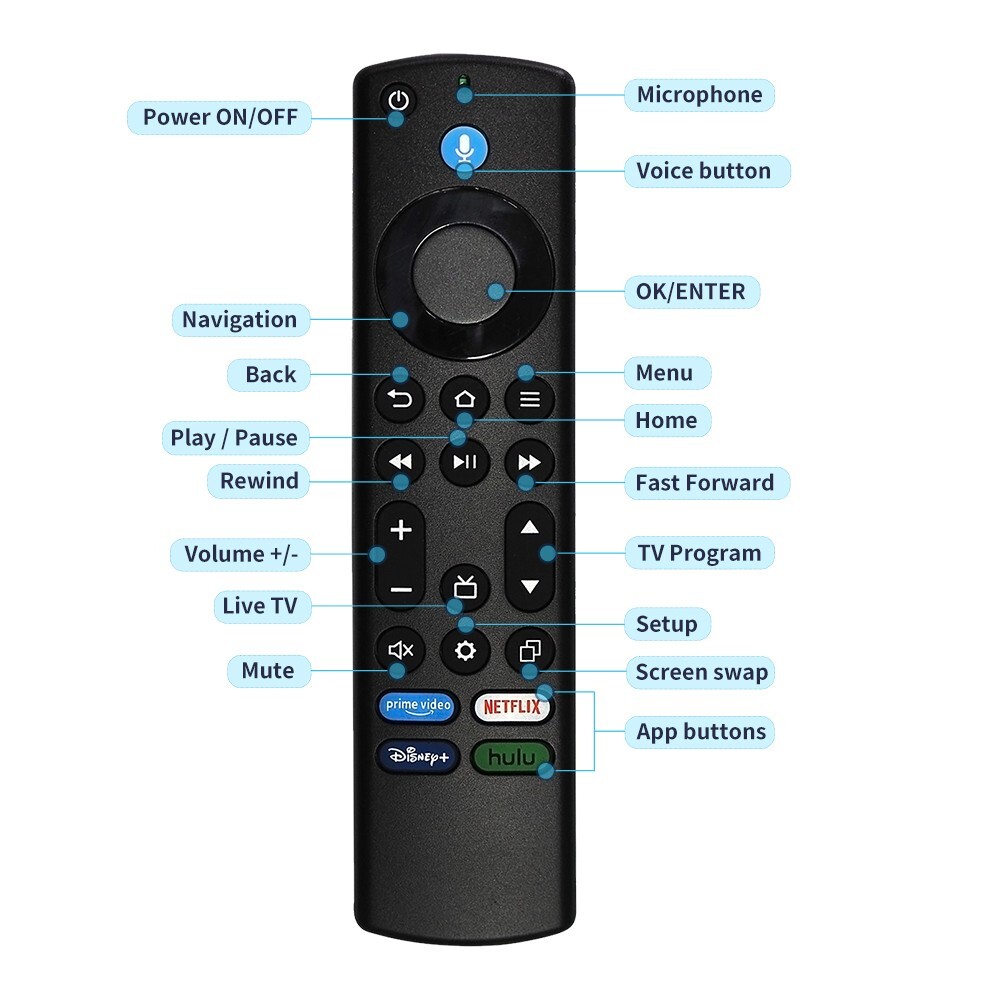
This remote integrates smart voice and convenient button design to create an efficient control experience:In-Depth Integration with Alexa Voice AssistantSupports voice commands: Enables content search and app control;Voice recognition range: Supports multi-language commands including English, with a recognition accuracy of over 95% when ambient noise is ≤ 60 decibels.One-Key Access to Popular PlatformsEquipped with 4 dedicated shortcut keys: Prime Video, Netflix, Disney+, and Hulu. No need for layered navigation—press the corresponding button to launch the app directly;Full-function physical buttons: Includes basic buttons such as power, volume ±, channel ±, input source switching, and menu. Even if the device does not support voice, all physical functions can still be controlled normally.
4. Precautions & After-Sales Guarantee: Worry-Free Usage
Instructions on Usage LimitationsSpecial scenarios: After the device is restored to factory settings, the original remote is required for initialization during the first pairing. This remote can be used as a replacement for subsequent use.Packaging & After-Sales ServicePackage Contents: 1* Voice Remote Control (Battery not included)After-Sales Guarantee:technical support: For pairing issues or functional questions, you can contact customer service at any time to receive one-on-one remote guidance.
With precise compatibility, smart interaction, and comprehensive after-sales service, this remote provides a seamless replacement solution for multi-brand smart devices, making control simpler and more efficient.
This replacement voice remote is specifically designed for cross-brand smart devices, accurately compatible with Insignia, Toshiba, Pioneer, and Amazon ecosystem devices. It fully covers the following series and models to avoid the risk of incorrect purchase:
Compatibility with Mainstream TV Brands
Insignia Smart TVs: F30, F20, F50, DF710, DF711, DF310, DF510, DF311, DF620 series
Toshiba Smart TVs: LF711, LF621U, LF421U, LF221U, C350, A810U, A710U, M550, V35 series
Pioneer TVs: PN450, PN651, PN851, PN951, PN55851-23U, PN50951, PN43951-22U, PN43651, PN32451 series.
Exclusive Compatibility with Amazon Devices
Amazon Smart TVs: All models of the Omni series and AMZ 4 series;
Fire TV Devices:
Fire TV Stick (1st/2nd/3rd Gen), Fire TV Stick 4K Max (1st/2nd Gen), Fire TV Stick 4K (1st/2nd Gen), Fire TV Stick Lite;
Fire TV Cube and Smart TVs (3rd Gen);
2. Voice Pairing & User Guide: One-Key Activation of Smart Control
This remote adopts dual technologies of "Bluetooth automatic pairing + voice wake-up" and supports Alexa smart voice interaction. The entire operation takes no more than 3 minutes:
Preparation Before Pairing
Prepare 2 AAA dry batteries in advance (not included in the package);
3-Step Pairing Process
Battery Installation: Open the snap-on battery compartment on the back of the remote, insert the batteries according to the positive and negative markings, and the indicator light will turn on briefly after closing the compartment;
Start Pairing: Press and hold the "Home Button" at the top of the remote for 10-15 seconds until the LED indicator flashes rapidly (at a frequency of approximately 2 times per second);
Complete Connection: Release the button and wait for 60 seconds. A "Pairing Successful" prompt will appear on the TV/device screen, and you can then test voice commands.
Troubleshooting for Pairing Failures
If pairing fails, disconnect the device from power for 30 seconds, restart it, and try again;
Ensure the distance between the device and the remote is within 10 meters, and there are no Bluetooth interference sources.
3. Core Feature Highlights: Dual Control via Voice + Shortcut Keys
This remote integrates smart voice and convenient button design to create an efficient control experience:In-Depth Integration with Alexa Voice AssistantSupports voice commands: Enables content search and app control;Voice recognition range: Supports multi-language commands including English, with a recognition accuracy of over 95% when ambient noise is ≤ 60 decibels.One-Key Access to Popular PlatformsEquipped with 4 dedicated shortcut keys: Prime Video, Netflix, Disney+, and Hulu. No need for layered navigation—press the corresponding button to launch the app directly;Full-function physical buttons: Includes basic buttons such as power, volume ±, channel ±, input source switching, and menu. Even if the device does not support voice, all physical functions can still be controlled normally.
4. Precautions & After-Sales Guarantee: Worry-Free Usage
Instructions on Usage LimitationsSpecial scenarios: After the device is restored to factory settings, the original remote is required for initialization during the first pairing. This remote can be used as a replacement for subsequent use.Packaging & After-Sales ServicePackage Contents: 1* Voice Remote Control (Battery not included)After-Sales Guarantee:technical support: For pairing issues or functional questions, you can contact customer service at any time to receive one-on-one remote guidance.
With precise compatibility, smart interaction, and comprehensive after-sales service, this remote provides a seamless replacement solution for multi-brand smart devices, making control simpler and more efficient.
Price type
IN STOCK
OUT STOCK







 .
.
